Hi everyone,
I am trying to compare two different foil designs on a sailing boat. Currently, I have a “baseline” configuration applied to both the starboard and port foils, and a second configuration I would like to evaluate.
The issue is that when I add the second foil to the model, its lift and drag forces immediately affect the boat’s equilibrium (heel, trim, and leeway). This makes a direct “apples-to-apples” comparison impossible because the boat’s state changes.
Is there a known workaround to “isolate” the performance data of a secondary foil without it influencing the global boat parameters?
Thank you, Edoardo.

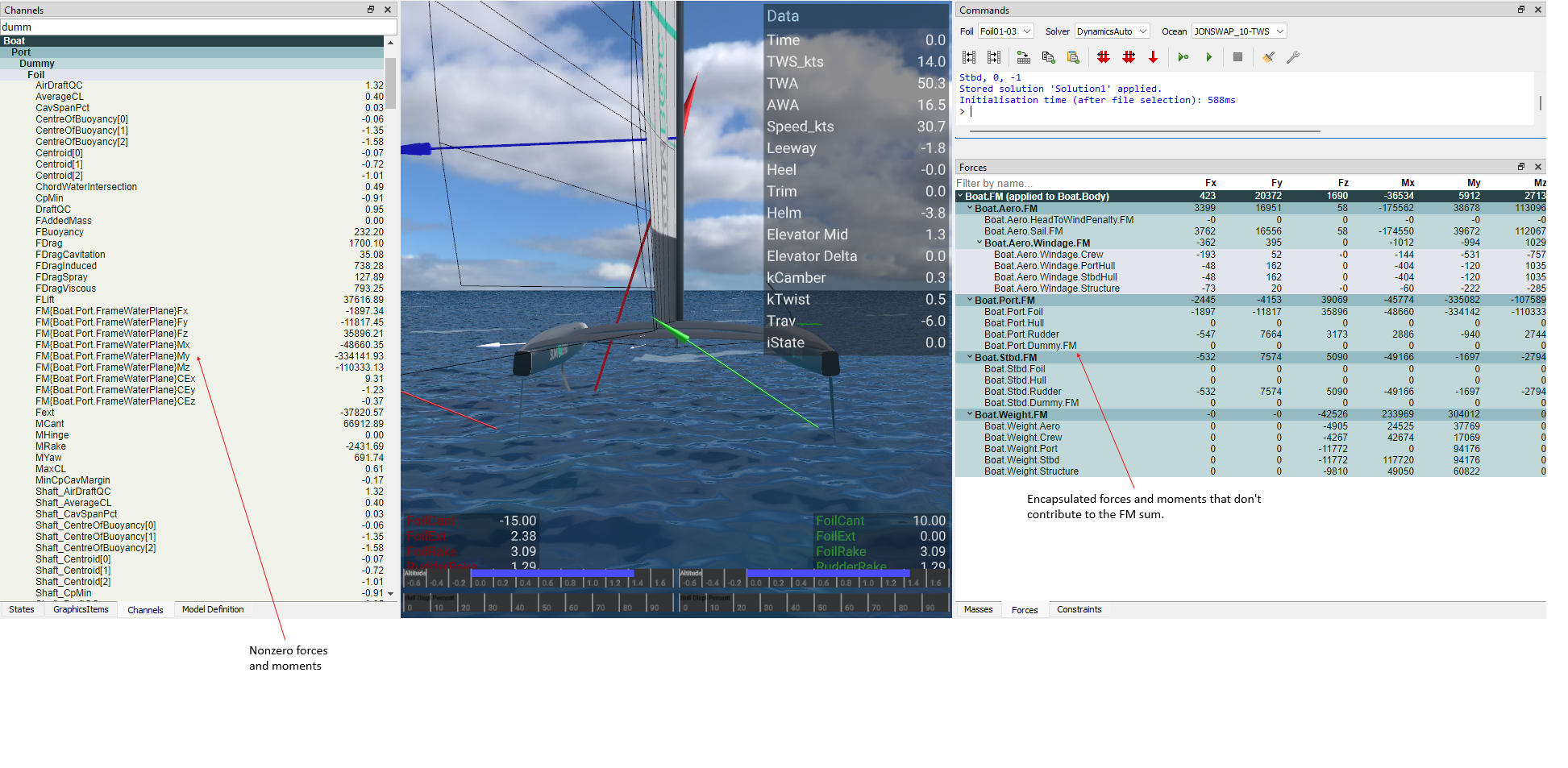
It is possible to add the second foil and encapsulate the forces of the block and set them to 0. In this case, all calculations are performed on the second foil, which acts as a ‘dummy block‘, and will not contribute to the total sum of forces and moments in the global balance.
ForceMoment Structure Example
For a boat, the hierarchy would look as follows:
-
FM // (A) Global ForceSum block
-
Boat
-
FM // (B) ForceSum block (Sum of Port, Stbd, and Dummy)
-
Port
-
FM // (C) Force of 'Port'
-
-
Stbd
-
FM // (D) Force of 'Stbd'
-
-
Dummy
-
FM // (E) Explicitly set to 0
-
-
-
Aero
-
FM // (F) Force of 'Aero'
-
-
Overwriting the ForceMoment
To set the forces to zero while maintaining the calculation data in the channels, use the following structure in your code view:
FM: BL.ForceMoment({
  "F": [0, 0, 0],
  "M": [0, 0, 0],
  "ForceReport": {
    "Type" : "PlaneIntersection",
    "r" : [0, 0, 0],
    "n" : [0, 1, 0]
  }
}),
Expected Results
If the process is implemented correctly, the dummy object will display zeros in the forces section of the interface. However, the values in the channel section will remain non-zero.
The screenshot attached shows an example where the forces and moments are encapsulated for a copy of the foil. These forces and moments can still be exported, as the values in the channel section are included in the .csv export.