

How can I connect to Gomboc from another machine using GCP?
Currently, I have the following when opening a Gomboc instance:
Info | GCP::Server | listening on 127.0.0.1:8080

Info | GraphicsServer | Listening on 127.0.0.1:10000

Info | GraphicsServer | Enabling UDP mode (src: 127.0.0.1:61623, dest: 127.255.255.255:10000)

You can’t really choose the listening address freely. Typically you bind a listening socket to a particular interface or to all interfaces. In Gomboc, by default it binds the local interface, which means GCP connections are local to the computer. If you want to allow GCP clients from other machines, you need to enable the option to bind to all the interfaces in the “Wobble the Gomboc”:
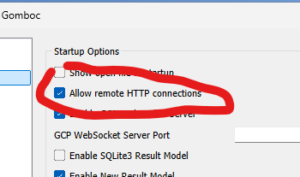
If you re-open a Gomboc instance once the “Allow remote HTTP connections” is checked, you should now see:
Info | GCP::Server | listening on 0.0.0.0:8080

Info | GraphicsServer | Listening on 127.0.0.1:10000

Info | GraphicsServer | Enabling UDP mode (src: 127.0.0.1:51305, dest: 127.255.255.255:10000)
When “Allow remote HTTP connections” is checked, Gomboc accepts connections from other machines. You connect using the IP address of the machine that runs Gomboc. For instance, if Gomboc is running on a machine with IP address 192.168.1.10, then the IP address to connect to is http://192.168.1.10:8080/. Indeed, Gomboc starts with HTTP and WebSocket server on port 8080 on first instance, 8081 if you have 2nd instance, etc.
This link should bring the start page (the index.html located in Runtime/HTML). Then, all the other linked pages and the ones you can start from HTML menu should work too.
If you do the GCP connection test on the same machine, then http://localhost:8080/ works always, however using your actual IP address http://[myipaddress]:8080/ only works if you enable remote HTTP connections.
WARNING: GCP is well equipped to extract data from Gomboc, but quite limited to push data to Gomboc. If you want to push data to Gomboc (e.g. external controller), you might be better off using NMEA1083 over UDP via devices (see manual section [Devices / Device Types / NMEA0183]).
NOTE: the message you have when opening a Gomboc instance also shows that you have checked the option “Enable Graphics Server” in the “Wobble the Gomboc”. Learn more about Graphics server in the manual section [Graphics / Network Graphics]