When running a Design of Experiment by executing python from a Jupyter NOtebook, any value over 30 threads throws this error pictured and doesn’t start those extra simulations (I tried 36 threads and 6 Gomboc instances failed). Is this a limitation in Gomboc and the number of instances capable of simultaneously running or is this something else?
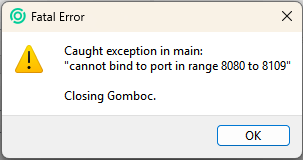

The thread problem is likely to be linked to the port range default setting of 30. The port range setting is basically how many ports the script tries before abandoning, meaning that creation of the server will throw an error if it can’t find a free port after trying 30 ports.
1st solution When launching Gomboc instances from a python script and then controlling those instances with python, one solution is to specify which port to use for each instance explicitly using --ws-port=88XX. Otherwise, you have no idea if you really talk to the instance you have launched. So assuming you launch from Python, you would launch the first Gomboc.exe instance using --ws-port=8080, the second GOmboc.exe instance using –ws-port=8081, etc.
Note that when specifying explicitly the port, you basically say “I want that port, fail if it’s not free”, so the port range concept becomes obsolete and the port range setting is inactive. When not specifying, you are basically saying, “open any free port, I’m going to take a guess at where I connect to that instance and don’t care if I got that guess wrong”, but this guess is limited by the port range setting.
2nd solution
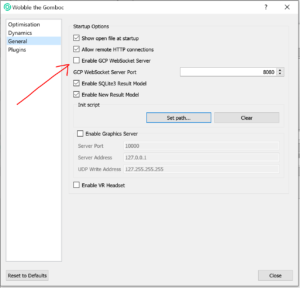
You can also switch-off the GCP functionality on your machine, then there is not port issue. There is no command-line option to deactivate it yet, but you can deactivate it easily from the GUI: